import numpy as np
from numba import cuda

N = 10_000
a, b = np.random.randn(N), np.random.randn(N)
a.shape, b.shape
((10000,), (10000,))

Allocate the memory on the CPU.
import numpy as np
from numba import cuda
N = 10_000
a, b = np.random.randn(N), np.random.randn(N)
a.shape, b.shape((10000,), (10000,))def add():
c = np.zeros_like(a)
for i in range(N):
c[i] = a[i] + b[i]
return c
with timer():
c1 = add()12.0794 msFor making the sequential loop parallel we have to leverage CUDA’s multithread system. The CPU machine is called host while the GPU machine is known as device. The GPU has its own separate memory (device global memory). To do work on the GPU
cudaMalloc)cudaMemcpy)cudaFree)| CUDA C | Numba CUDA |
|---|---|
cudaMalloc |
cuda.device_array() |
cudaMemcpy (host→device) |
cuda.to_device() |
cudaMemcpy (device→host) |
d_array.copy_to_host() |
cudaFree |
Automatic (garbage collected) |
Think of it like packing a suitcase: you pack your data, send it to the GPU, do work there, then bring the results back.
Visualizing the memory allocation and transfer process.
When a kernel launches, the CUDA runtime creates a grid of threads organized in two levels:
threadIdx.x, blockIdx.x, blockDim.x)i = blockIdx.x * blockDim.x + threadIdx.xEach thread can identify itself using three built-in variables:
| Variable | Purpose |
|---|---|
threadIdx.x |
Thread’s index within its block (0, 1, 2, …) |
blockIdx.x |
The block’s index within the grid |
blockDim.x |
Total number of threads per block |
Each thread executes the same code but works on different data (this is called SPMD — Single Program, Multiple Data). Continuing the suitcase metaphor each thread uses its unique index to work on one element of the data.
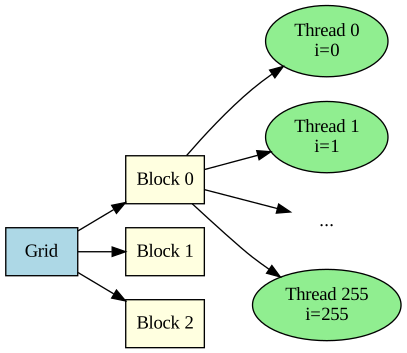
NO_THREADS = 256
NO_BLOCKS = N/256
NO_THREADS, NO_BLOCKS
(256, 39.0625)The 39.0625 is a floating point number. But it not physically possible we have to allocate block we have to use an int. By rounding down 39 * 256 = 9,984 thread but N = 10,000. We have to use ceil operation for that in the 40th block only 16 threads will be used and the rest will be idle during during computation. CUDA kernels need a bounds check, as 240 idle threads will still run the kernel code, but they’d be accessing memory out of bounds (indices 10,000 to 10,239). One has to be mindful for these idle blocks.
NO_BLOCKS = dim(N, 256)
NO_BLOCKS40| CUDA C | Numba | Meaning |
|---|---|---|
__global__ |
@cuda.jit |
Kernel - called from host, runs on device, launches grid |
__device__ |
@cuda.jit(device=True) |
Device function - called from kernel/device only |
__host__ |
Regular Python function | Runs on CPU |
@cuda.jit # compile the code to be run on GPU
def add_kernel(a, b, c):
    #idx = cuda.grid(1)
    idx = cuda.threadIdx.x + cuda.blockIdx.x * cuda.blockDim.x

    if idx < N and idx >= 0: # Boundary check
        c[idx] = a[idx] + b[idx]
#c = np.zeros_like(a)
#assert c.shape == a.shape
#add_kernel[40, 256](a, b, c)
device(a), device(b)('cpu', 'cpu')If you are running using cuda sim. The function will run without any error. But there is subtle issue. We have to move data from cpu to gpu i.e. host to device before running the code other wise we will see following error:
/usr/local/lib/python3.12/dist-packages/numba_cuda/numba/cuda/dispatcher.py:697: NumbaPerformanceWarning: Grid size 40 will likely result in GPU under-utilization due to low occupancy.
  warn(NumbaPerformanceWarning(msg))
1.06 ms ± 110 µs per loop (mean ± std. dev. of 7 runs, 1 loop each)
/usr/local/lib/python3.12/dist-packages/numba_cuda/numba/cuda/cudadrv/devicearray.py:937: NumbaPerformanceWarning: Host array used in CUDA kernel will incur copy overhead to/from device.
  warn(NumbaPerformanceWarning(msg))
# moving data to GPU
d_a = cuda.to_device(a)
d_b = cuda.to_device(b)
device(d_a), device(d_b)('cuda', 'cuda')# allocating new array for holding computation
d_c = cuda.device_array(N, dtype=a.dtype)
device(d_c)'cuda'with timer():
add_kernel[40, 256](d_a, d_b, d_c)0.2293 mstest_close(d_c.copy_to_host(), c1)True